An AI agent without memory is expensive autocomplete. I gave my agents two memories: one they write to, one they query. The second is LightRAG — the piece I’ve fought with hardest and learned most from.
This is Part 2 of 6 in the Building a Private Local-AI Stack series.
- The Use Case
- LightRAG as a Personal Knowledge Base (this post)
- OpenRouter and the Case for Safe Models
- Right-Sizing a Local LLM with llmfit
- AionUi: A GUI for Your CLI AI Agents
- Basic Memory: An AI Memory in My Obsidian Vault
Two Memories, One Split Brain
I tried building one memory for everything — write, search, sync. It was a mess. The semantic index choked on half-finished agent notes and writes blocked indexing. The fix was splitting it clean.
The write store is basic-memory — plain Markdown on disk. When an agent needs to remember a decision or a fact, it writes a note. Syncthing replicates it to my Obsidian vault with zero drama. If every AI tool vanished tomorrow I’d still have readable files. I’ve watched tools come and go; Markdown outlives them all.
The query layer is LightRAG, running at http://127.0.0.1:9621. When an agent needs to recall something — “what did I decide about X six months ago” or “who was that contractor” — it asks LightRAG. LightRAG has embedded my entire document corpus and built a knowledge graph on top. It answers semantic questions grep never could.
The split works because writing and recalling want opposite things. Writing wants to be instant and dumb — append a note, sync it, done. Recalling wants to be smart — embeddings, graph edges, community summaries. Trying to do both in one place compromises both. I learned this the hard way, watching a monolithic store fail at everything simultaneously.
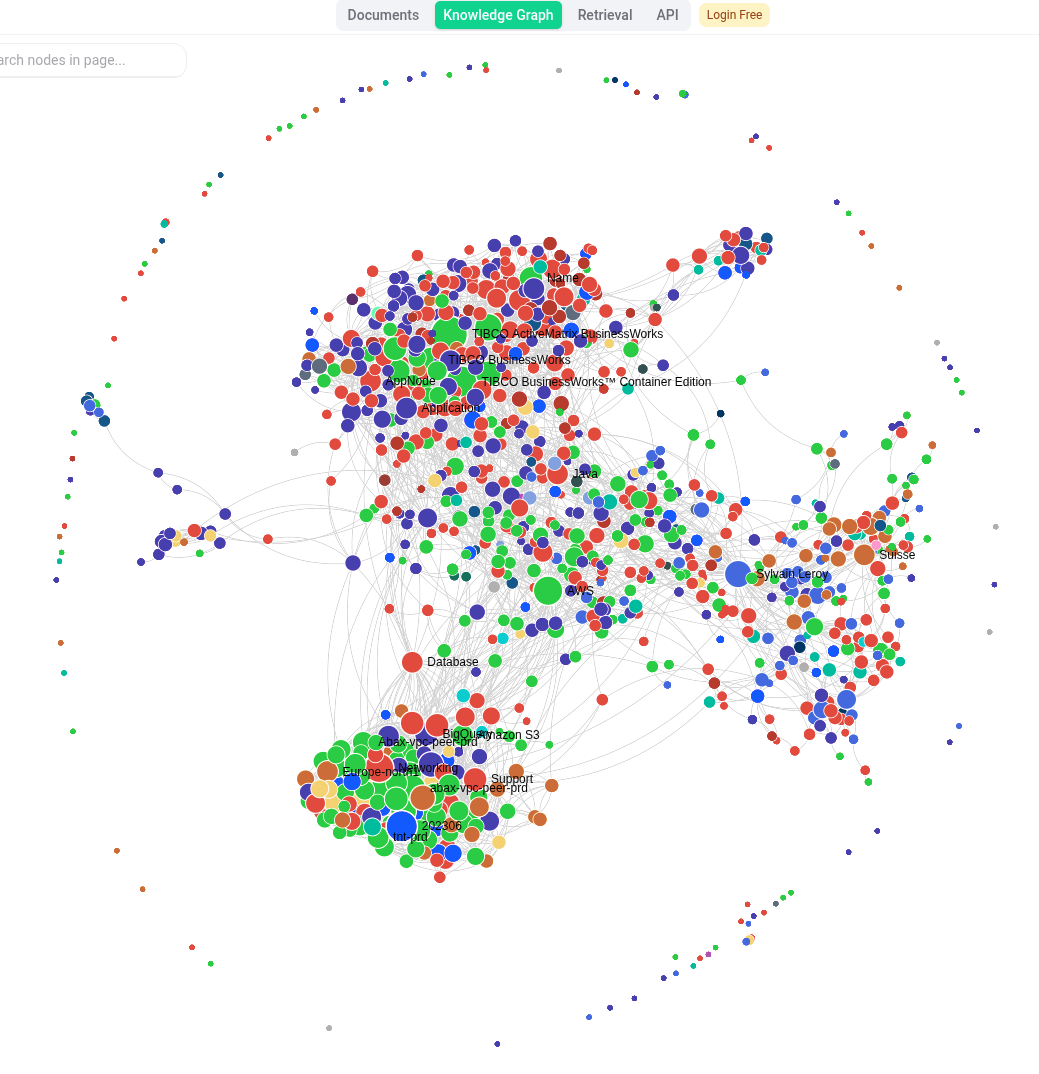
 The LightRAG WebUI at 127.0.0.1:9621 — the knowledge graph view showing entities extracted from my document corpus and the relationships between them.
Wiring: Two Containers, 11,000 Documents
LightRAG runs as two Docker containers. The first serves API and WebUI at 127.0.0.1:9621 — agents query it, I browse the graph. The second is an indexer that wakes every six hours, walks my document tree, and hands new files to LightRAG for embedding and graph construction. Storage is JSON on disk. For ~11,000 documents — years of notes — that’s plenty, and I can cat the storage when things break.
Eleven thousand documents beat my own memory. It’s also small enough that slow indexing and JSON storage keep up. There’s something deeply satisfying about grepping your knowledge base when fancy tools fail — plain text is the ultimate fallback.
(Config aside: no secrets in plaintext. Provider keys live in pass and get injected at runtime. The env var names here are fine to publish; their values stay in pass.)
Tuning: Not Everything Deserves an Embedding
The first time I pointed the indexer at my full tree it tried to eat my ebook library — multi-gigabyte PDFs, scanned books, a decade of downloads. It bloats the index with noise and burns compute on content I’ll never recall. Worse, queries returned irrelevant textbook matches instead of my notes.
Two knobs fix this. KB_EXCLUDE is a path list the indexer skips — my ebook and PDF-library directories live there. KB_MAX_BYTES is a hard cap on file size; anything above it gets skipped regardless of where it lives. This catches the stray giant export or log that slips past the exclude list.
The principle: an index is only as useful as it is selective. Indexing everything drowns the signal. Curating what goes in is the difference between a knowledge base and a landfill. I learned this watching my first index surface random ebook excerpts when I asked about actual work.
Retrieval Modes: Picking How Hard to Think
LightRAG has five retrieval modes: naive (flat semantic search, fast and dumb), local (entity expansion for “tell me about this”), global (whole-graph summaries for diffuse questions), hybrid (naive + local, the default), and mix (everything, slowest). In practice I live in hybrid, drop to naive when I want speed, and escalate to mix when hybrid returns nothing useful. The modes are a dial for how hard the system should think.
Knowing which mode to reach for is half the skill. I used to default to mix because more machinery felt safer — it isn’t. Slow queries train you to ask worse questions. Hybrid gives you 90% of the value in a third of the time.
War Story: The Health Check That Lied
Retrieval stopped working one day. Not with a crash — it just stopped returning anything useful. Ingestion had died too, silently. And the whole time the health endpoint reported healthy. Green light, everything fine. Except nothing was fine.
I spent an hour assuming the problem was local. Restarted containers, checked disk space, tailed logs looking for obvious crashes. Nothing. The process was running, the API responded, the WebUI loaded — and yet every query came back empty or errored.
The symptom map was the tell: hybrid and local queries returned 500 errors (these modes need the LLM for entity expansion and graph reasoning). Naive returned “no context found” instantly (flat search still ran, found nothing new, shrugged). Health check: green.
That split — some modes erroring, one mode shrugging, health check green — was the fingerprint of an upstream failure, not a LightRAG failure. LightRAG’s process was genuinely healthy. The thing it depended on wasn’t.
Root cause: an upstream budget cap at the model provider had tripped. The provider was returning HTTP 403 on every call. LightRAG’s health check doesn’t — and can’t — know that. A health check verifies the process is running and can answer a ping. It says nothing about whether the LLM and embedding provider one hop upstream are reachable, funded, and willing to talk.
The fix was in the container logs. Not the health endpoint, not the WebUI — the logs, where the 403s sat in plain sight. Diagnosis took thirty seconds once I read them. The debugging time was all spent trusting the wrong signal.
The lesson: a service health check tells you the process is up, not that its dependencies are. When something that talks to an external provider goes quiet, read the logs before you trust the dashboard. Green doesn’t mean working. It means “not dead yet.”
(Bonus lesson from the same incident: some documents had been failing to index silently because the embedding timeout was unset. Raising EMBEDDING_TIMEOUT fixed it. Two silent failures, one day — a reminder that “no error” and “working” aren’t the same thing.)
The Payoff: Email Triage That Actually Knows
The architecture earns its keep in something mundane: sorting my inbox.
I run himalaya, a command-line email client, as the hands an agent can drive without a browser. On its own the agent is working blind — it sees a sender and a subject and guesses. Wired to LightRAG it’s a different tool. As it sorts Gmail it queries the knowledge base: who is this sender, what have we discussed, does this thread connect to a project I already have notes on. “Unknown sender, probably ignore” becomes “this is the contractor from the March thread, flag it.”
That’s what it feels like when an assistant has memory that spans years. Not a goldfish relearning the tank every morning — a colleague who recalls the context I’ve forgotten. I’ve had the agent surface threads from two years ago that I had zero memory of, and the recall was accurate enough to act on. That moment — when the machine remembers better than you do — is when infrastructure stops feeling like a toy.
The two-memory split pays off here. basic-memory holds what the agent decided to remember; LightRAG surfaces what I already knew across 11,000 documents; himalaya acts on it. The knowledge base stops being a demo and becomes infrastructure. It’s not perfect — sometimes it hallucinates connections, and I still have to review its decisions — but it’s good enough that I trust it with real work.
What’s Next
The knowledge base gives the stack a memory. The next question is which brain does the thinking — and that’s where the sensitivity boundary from Part 1 turns into a real routing decision. Part 3 is OpenRouter and the case for safe models: the cloud engine, and the exact line I refuse to let personal data cross.
LightRAG taught me more about what it takes to run a production knowledge base than any tutorial could. The failures were the education. If you’re building something similar, plan for the silent ones — they’re the ones that cost you time.
Any opinions in this article are my own.