The whole point of the sensitivity boundary I have been building toward across this series is that some data never leaves my machine. Non-PII questions go to a cloud safe model; anything sensitive stays local. That local half only works if I actually have a model that runs on the hardware I own — 16 CPU cores, roughly 20 GiB of usable RAM, and no big GPU to hide behind. Picking that model used to be pure guesswork. Guess too big and it swaps to death or OOMs; guess too small and it’s too weak to trust. llmfit ended that.
This is Part 4 of 6 in the Building a Private Local-AI Stack series.
- The Use Case
- LightRAG as a Personal Knowledge Base
- OpenRouter and the Case for Safe Models
- Right-Sizing a Local LLM with llmfit (this post)
- AionUi: A GUI for Your CLI AI Agents
- Basic Memory: An AI Memory in My Obsidian Vault
What It Does
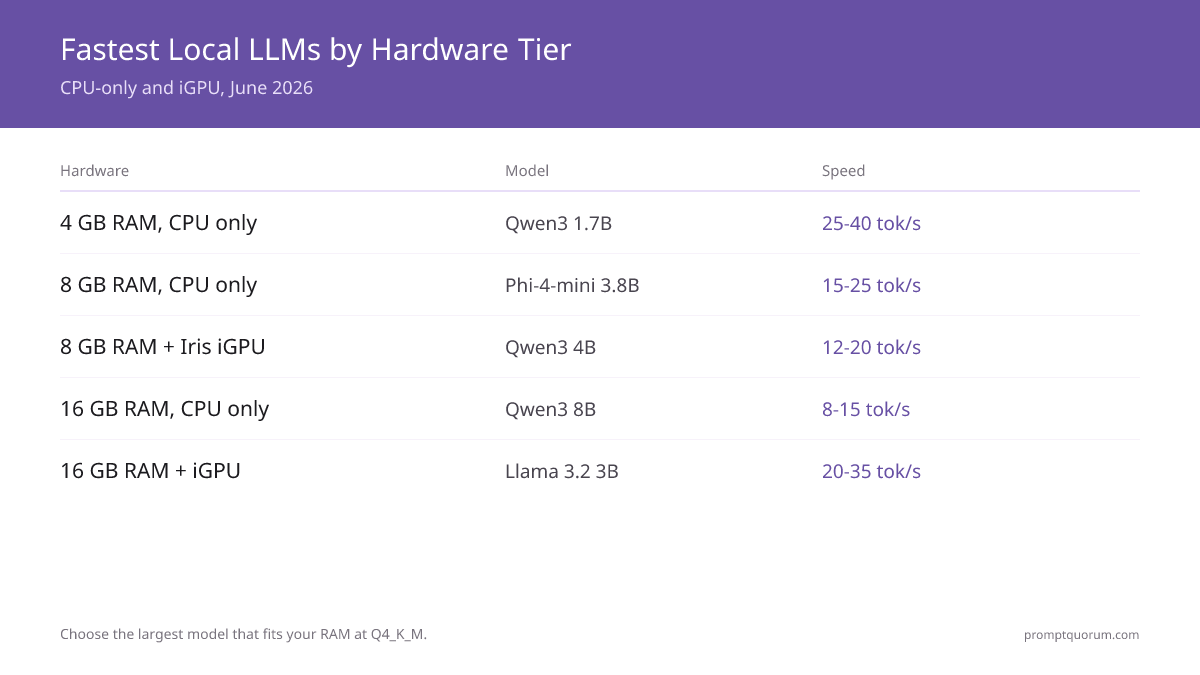
 Local LLM performance tiers on consumer hardware — balancing speed, quality, and memory fit. Source: promptquorum.com
llmfit is an open-source Rust tool by Alex Jones. MIT licensed, actively maintained. It detects your hardware and scores every model in its catalog on memory fit, estimated speed, quality, and context length — the four questions that matter when you’re trying to decide what will actually run. It ships a TUI for exploring and a CLI for scripting. I use it regularly via the Docker image (ghcr.io/alexsjones/llmfit) because I don’t want to manage Rust toolchains on my laptop.
The idea is refreshingly direct. You point llmfit at your machine — CPU, cores, RAM, GPUs if you have them — and it tells you which models will actually fit and roughly what you’ll get when you run them. That four-way scoring is the whole trick. “Does it fit” and “is it any good” and “is it fast enough to be usable” are three different questions, and a model can pass one while failing the others. llmfit answers them together so you see the trade-off instead of discovering it the hard way.
Run llmfit fit and you get a ranked table of models sorted by how well they suit your machine. The columns tell you what fits, what’s fast enough to be usable, and what’s smart enough to trust. It understands quantization, so a full-precision 13B and its 4-bit quant get scored separately — often the difference between “won’t fit” and “fits comfortably.” It understands multi-GPU splits and mixture-of-experts models, whose active footprint is smaller than their file size. On my GPU-less box, the MoE and quantization awareness are what make its verdicts trustworthy.
The transparency is what sold me. llmfit info "<model>" shows the assumptions behind an estimate — not just “expect N tokens/sec” but the inputs that produced that number, plus the commands to verify them yourself. Every speed estimate is grounded in a memory-bandwidth model and community measurements rather than a black-box vibe. A number I can audit is a number I can act on; a number I can’t is just someone else’s guess dressed up as data.
There’s also a leaderboard. llmfit lets you measure real tokens-per-second on your own machine and submit the result back via a pull request you can open straight from the TUI. Merged submissions ship in the next release. That’s a genuinely good design — it turns a private guessing game into a shared, growing dataset of “here is what this model really does on this class of hardware.” I’ve contributed measurements from my box for exactly that reason: it costs me one benchmark run and makes the tool better for everyone with similar hardware.
How I Use It
Day to day I use two commands. Running llmfit with no arguments drops me into the TUI — scroll the catalog, sort by whichever dimension I care about, and inspect a candidate before committing. When I want a static, ranked answer I run llmfit fit. It prints a table of models ordered by how well they suit the detected hardware. I scan down for the models that fit 16 cores and ~20 GiB, then read across speed and quality. Memory fit is the hard gate — anything that won’t fit is off the table, full stop. Among what remains, I trade estimated speed against quality depending on the job: a model that is a hair slower but noticeably smarter usually wins for reasoning over my own documents.
I deliberately won’t tell you “run model X.” That would age badly the day a better quant lands, and it would be the wrong lesson anyway. The point is the method: the right local model is a function of your hardware and your workload, and llmfit is what turns that function into a table you can read instead of a weekend you can lose. My choice is whatever tops that filtered ranking on my machine this month — and next month I’ll re-run it.
Why It Matters for This Stack
llmfit is how I pick the local model for the PII half of this stack. A knowledge base gives my agents real memory, OpenRouter gives them the best cloud brains for non-PII work, and llmfit makes sure the private brain is one my laptop can actually run. It’s not exotic. It’s just the discipline of deciding what matters and then wiring the tools to hold that line.
Any opinions in this article are my own. llmfit is the work of Alex Jones and is MIT licensed — I’m just a grateful user.