A React single-page application (SPA) in front of an agent on Amazon Bedrock AgentCore Runtime is a common setup, and sooner or later the agent needs something only the user can provide. Which protocol carries the question to the browser? How does the agent stop without losing its place? How does the answer get back, and how does the run resume where it paused instead of starting over?
Watch the 30-second summary
Auto-generated summary — read the full article below for details.
The AWS Machine Learning Blog post Human-in-the-loop constructs for agentic workflows in healthcare and life sciences covers the agent side with four ways to pause an agent on AgentCore Runtime: a hook on tool calls, an interrupt inside the tool, an asynchronous approval through AWS Step Functions, and Model Context Protocol (MCP) elicitation. What it doesn’t show is the browser code, and the round-trip between the browser and the paused run is rarely explained end to end.
This post fills that gap. It uses the interrupt-inside-the-tool approach and builds the round-trip twice: first by hand over a WebSocket, then over AG-UI, an open agent-to-user protocol that removes most of the hand-written code. Along the way, you see how AgentCore Runtime isolates sessions, when it reclaims a paused run, and why, in my testing, the browser has to send the first WebSocket frame.
The running example is a Know Your Customer (KYC) form filler that asks for five fields one at a time. It’s built with the Strands Agents SDK, which uses Amazon Bedrock as its default model provider, and tested with strands-agents 1.57.1, bedrock-agentcore 1.23.1, and ag-ui-strands 0.4.1. All names and values are fictitious.
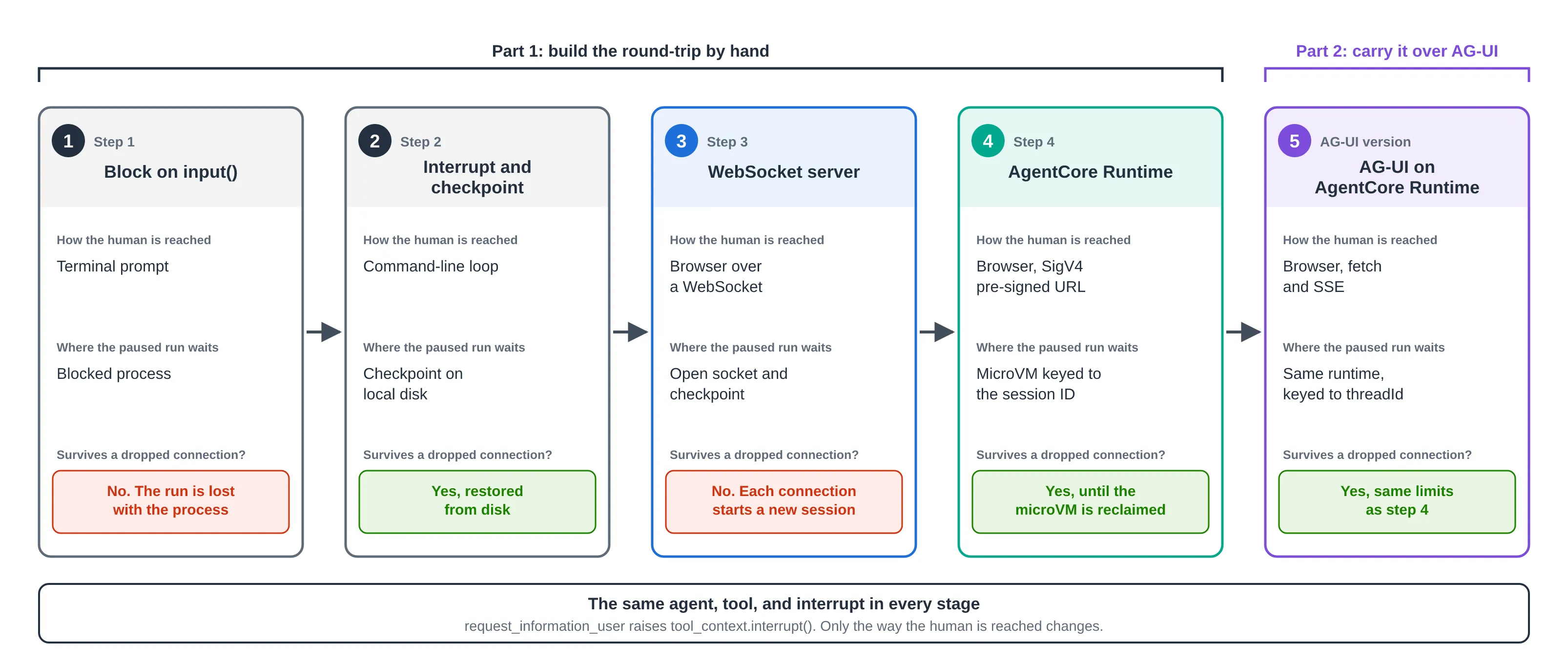
The five stages
The solution grows in five stages, from a blocking input() call to AG-UI on AgentCore Runtime:

- The agent blocks on
input()in a terminal. - The tool raises an interrupt, and the run is saved to a checkpoint.
- A WebSocket server carries the question to a browser — but each connection starts a new run.
- AgentCore Runtime keys the checkpoint to its session ID, so a reconnect resumes the same run.
- AG-UI carries the round-trip over Server-Sent Events (SSE) and keys the checkpoint to its
threadId.
What makes a paused agent different
An SPA is stateless between requests. An AgentCore session is stateful and can suspend in the middle of a run. When the KYC agent needs the birth date, it stops, and the run parks at a checkpoint that holds the four fields it already collected. The answer has to reach that same run — not a fresh one that starts the form over.
One question-and-answer cycle looks like this:
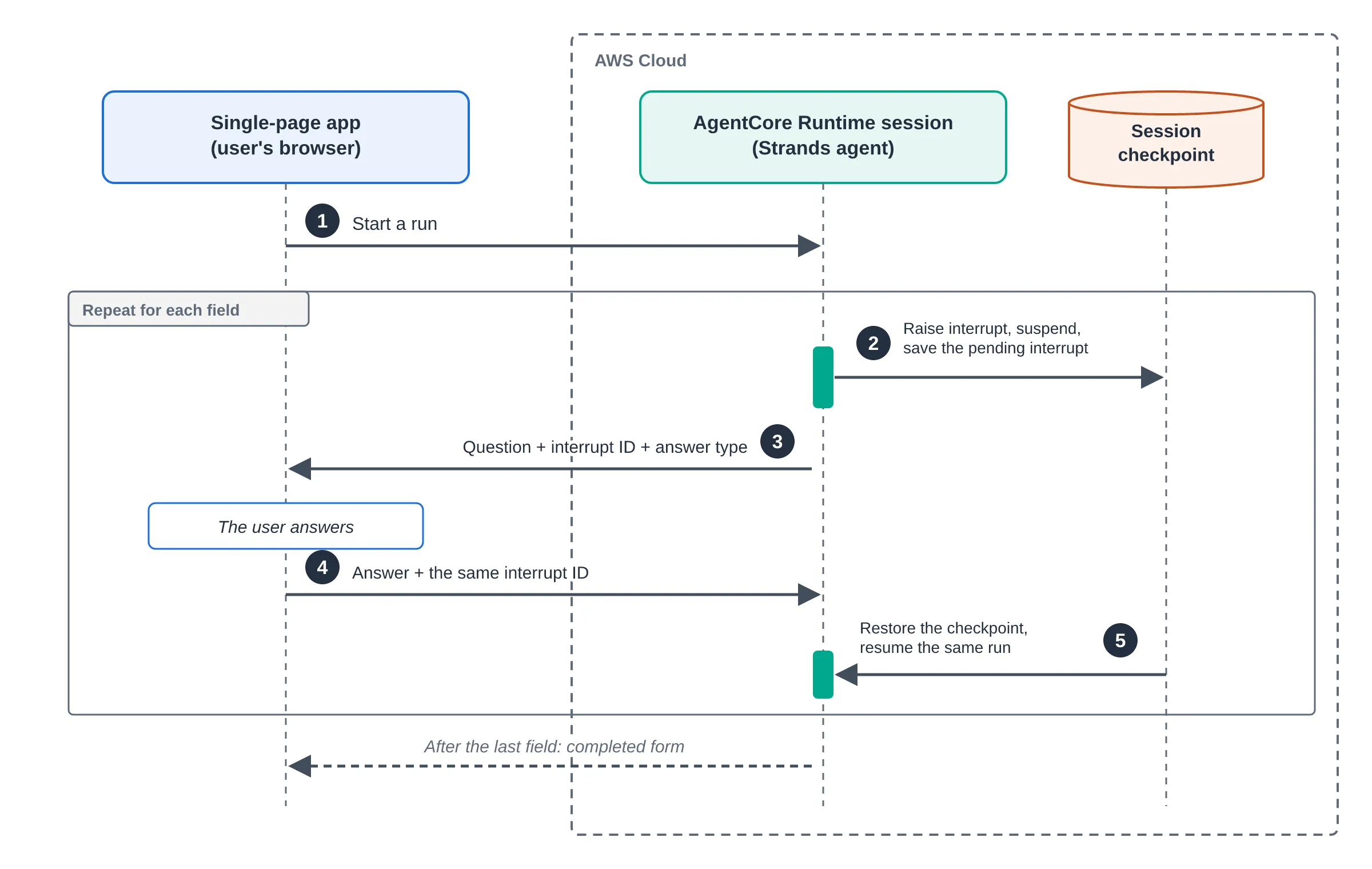
- The SPA starts a run.
- The agent raises an interrupt, and the run suspends at a checkpoint.
- The transport delivers the question to the SPA.
- The SPA sends the answer with the ID of the interrupt it belongs to.
- The run resumes from the checkpoint and asks for the next field — or returns the completed form.
Step 1: Block on input() in a local agent
The simplest version puts the human on the command line.
from strands import Agent, tool

@tool
def request_information_user(question: str, type_of_answer: str) -> str:
    """Ask the user for a single piece of information and return their answer."""
    return input(f"{question} ({type_of_answer}) ")

agent = Agent(tools=[request_information_user])
agent(KYC_SYSTEM_PROMPT)
This works only because the process and the human share one machine. Nothing can hand the question to a remote client, and once the process goes away, the run is gone.
Step 2: Turn the block into an interrupt
Instead of reading input, the tool raises an interrupt — the tool-context interrupt from the healthcare post. The run parks at a checkpoint and hands the question back to the caller as a reason payload, so the tool no longer knows how the human is reached.
from strands import Agent, ToolContext, tool

HUMAN_INPUT = "human-input"

@tool(context=True)
def request_information_user(
    tool_context: ToolContext, question: str, type_of_answer: str
) -> str:
    """Ask the human for one field by suspending the run until they answer."""
    answer = tool_context.interrupt(
        HUMAN_INPUT,
        reason={"question": question, "type_of_answer": type_of_answer},
    )
    return answer
The interrupt only pauses the run. If the next request builds a new agent, the answer reaches an empty conversation and the model asks for the first name again. A session checkpoint prevents that. SnapshotSessionManager saves the conversation, the agent state, and the pending interrupt, and building an agent with the same session ID restores them.
import os, uuid
from strands.session import SnapshotSessionManager
from strands.storage import LocalFileStorage

SESSION_STORAGE_DIR = os.environ.get("SESSION_STORAGE_DIR", "./sessions/")

def build_agent(session_id: str | None = None) -> Agent:
    session_manager = SnapshotSessionManager(
        session_id=session_id or f"hitl-agent-session-{uuid.uuid4().hex}",
        storage=LocalFileStorage(SESSION_STORAGE_DIR),
    )
    return Agent(tools=[request_information_user], session_manager=session_manager,
                 callback_handler=None)
Setting callback_handler=None stops Strands from printing the model’s output to stdout, which on AgentCore Runtime goes to Amazon CloudWatch Logs. The final message repeats every answer, so it shouldn’t end up there.
LocalFileStorage keeps the example simple, but its files live on the microVM’s disk and disappear when AgentCore reclaims it. In production, swap the backend and keep the rest of the code. Strands includes S3Storage for Amazon S3, and for Amazon DynamoDB you implement the same storage interface yourself.
from strands.storage import S3Storage

storage = S3Storage(bucket="amzn-s3-demo-bucket", prefix="kyc-sessions/")
The caller runs the agent until it suspends, collects the answer, and resumes the same run.
result = agent(KYC_SYSTEM_PROMPT)
while result.stop_reason == "interrupt":
    responses = []
    for interrupt in result.interrupts:
        if interrupt.name == HUMAN_INPUT:
            answer = prompt_human(interrupt)      # CLI for now
            responses.append({"interruptResponse": {
                "interruptId": interrupt.id, "response": answer}})
    result = agent(responses)                     # resume, don't restart
One detail cost me real debugging time: the tool must return the value from interrupt(). With a bare return, the model sees an empty result and asks the same question forever.
Choose a transport between the browser and the runtime
After Step 2, the question is just data, and AgentCore Runtime offers three ways to carry it. The agent code stays the same.
| HTTP | SSE | WebSocket | |
|---|---|---|---|
| Endpoint | POST /invocations | POST /invocations, streamed | /ws |
| How the answer comes back | A new request, same session ID | A new request, same session ID | A frame on the open connection |
| Streams model output | No | Yes | Yes |
| Browser authentication | OAuth bearer token | OAuth bearer token | SigV4 pre-signed URL, or OAuth in Sec-WebSocket-Protocol |
| Watch out for | No feedback during long turns | EventSource only sends GET, read with fetch | You write the reconnection logic |
HTTP is the simplest and the least responsive, SSE adds streaming, and a WebSocket feels the most live but leaves you to keep and restore the connection. Each one still needs the checkpoint, because every HTTP or SSE answer is a new request, and a dropped WebSocket needs it too. This post uses a WebSocket for the hand-built version and SSE for AG-UI.
Step 3: Move the loop to a WebSocket
Only the transport changes. The agent, the tool, and the resume loop are imported unchanged, and the server uses Starlette.
from starlette.applications import Starlette
from starlette.routing import WebSocketRoute
from hitl_agent_session import HUMAN_INPUT, KYC_SYSTEM_PROMPT, build_agent
from answer_validation import MAX_INVALID_FRAMES, invalid_answer_message, read_answer

async def hitl_endpoint(websocket):
    await websocket.accept()
    agent = build_agent()
    result = await agent.invoke_async(KYC_SYSTEM_PROMPT)
    while result.stop_reason == "interrupt":
        responses = []
        for interrupt in result.interrupts:
            if interrupt.name != HUMAN_INPUT:
                continue
            invalid_frames = 0
            while True:
                await websocket.send_json({
                    "type": "question", "interruptId": interrupt.id,
                    "question": interrupt.reason["question"],
                    "typeOfAnswer": interrupt.reason["type_of_answer"]})
                answer = await read_answer(websocket, interrupt.id)
                if answer is not None:
                    break
                invalid_frames += 1
                if invalid_frames >= MAX_INVALID_FRAMES:
                    return                      # the socket is closed on exit
                await websocket.send_json(invalid_answer_message())
            responses.append({"interruptResponse": {
                "interruptId": interrupt.id, "response": answer}})
        result = await agent.invoke_async(responses)
    message = result.message["content"] if result.message else "No message"
    await websocket.send_json({"type": "result", "message": message})

app = Starlette(routes=[WebSocketRoute("/ws", hitl_endpoint)])
invoke_async keeps the model call from blocking the event loop. Every client frame is untrusted, so read_answer accepts only a JSON object whose interruptId matches and whose response is a non-empty string of at most 500 characters. Other frames get an error reply, and five invalid frames close the session. The wire protocol has three message types.
server -> client   {"type": "question", "interruptId": "...", "question": "...", "typeOfAnswer": "string"}
client -> server   {"type": "answer",   "interruptId": "...", "response": "..."}
server -> client   {"type": "result",   "message": "..."}
Step 4: Host the agent on AgentCore Runtime
The Step 3 server runs wherever you host the process yourself — on a laptop or in a container on Amazon ECS or Amazon EKS. AgentCore Runtime instead hosts a container that follows a runtime service contract. The container listens on 0.0.0.0:8080, runs as an ARM64 image, answers GET /ping, and exposes a WebSocket at /ws. The bedrock-agentcore SDK provides that contract.
import os
os.environ.setdefault("SESSION_STORAGE_DIR", "/tmp/sessions")   # only /tmp is writable

from bedrock_agentcore import BedrockAgentCoreApp
from hitl_agent_session import HUMAN_INPUT, KYC_SYSTEM_PROMPT, build_agent

app = BedrockAgentCoreApp()

@app.websocket
async def hitl_endpoint(websocket, context):
    await websocket.accept()
    await websocket.receive_text()                         # "start" frame, explained below
    agent = build_agent(session_id=context.session_id)     # key the checkpoint to the session
    ...                                                    # same loop as Step 3

if __name__ == "__main__":
    app.run(port=8080)
context.session_id comes from the X-Amzn-Bedrock-AgentCore-Runtime-Session-Id header. Because the snapshot is keyed to it, a client that reconnects with the same session ID lands on the same checkpoint. Snapshots go to /tmp/sessions because the container’s working directory is read-only. I deployed the handler as an HTTP-protocol agent, which is correct for a WebSocket agent too, because /ws shares the HTTP container contract.
Send a start frame before the first question
Locally, the Step 3 handler sends the first question and waits. On AgentCore Runtime, the browser connected and received nothing, while CloudWatch Logs showed the question had already been sent. In my testing, the WebSocket proxy held server frames until the client sent one.
The fix is to read before the first send. The handler waits for a small start frame, which the SPA sends as soon as the socket opens, and each answer then releases the next question.
Connect to the agent over a WebSocket
A client connects to one endpoint per runtime:
wss://bedrock-agentcore.<region>.amazonaws.com/runtimes/<agentRuntimeArn>/ws
The caller needs the bedrock-agentcore:InvokeAgentRuntimeWithWebSocketStream permission and passes the session ID as a header or query parameter. The Get started with bidirectional streaming using WebSocket guide lists three ways to authenticate:
- SigV4 headers sign the handshake with AWS credentials. This suits backends, because browsers can’t set custom headers and shouldn’t hold AWS credentials.
- A SigV4 pre-signed URL carries the signature in query parameters, so a plain
new WebSocket(url)works. This post uses it. - OAuth 2.0 tokens travel base64url-encoded in the
Sec-WebSocket-Protocolheader from a browser. This needs an OAuth inbound authorizer and is the natural production choice.
The SDK creates the pre-signed URL with the session ID and a 300-second expiry. The browser can’t run this code, so the demo adds a local signing server that holds the credentials.
from bedrock_agentcore.runtime import AgentCoreRuntimeClient

client = AgentCoreRuntimeClient(region=AWS_REGION)
url = client.generate_presigned_url(runtime_arn=AGENT_ARN, session_id=sid, expires=300)
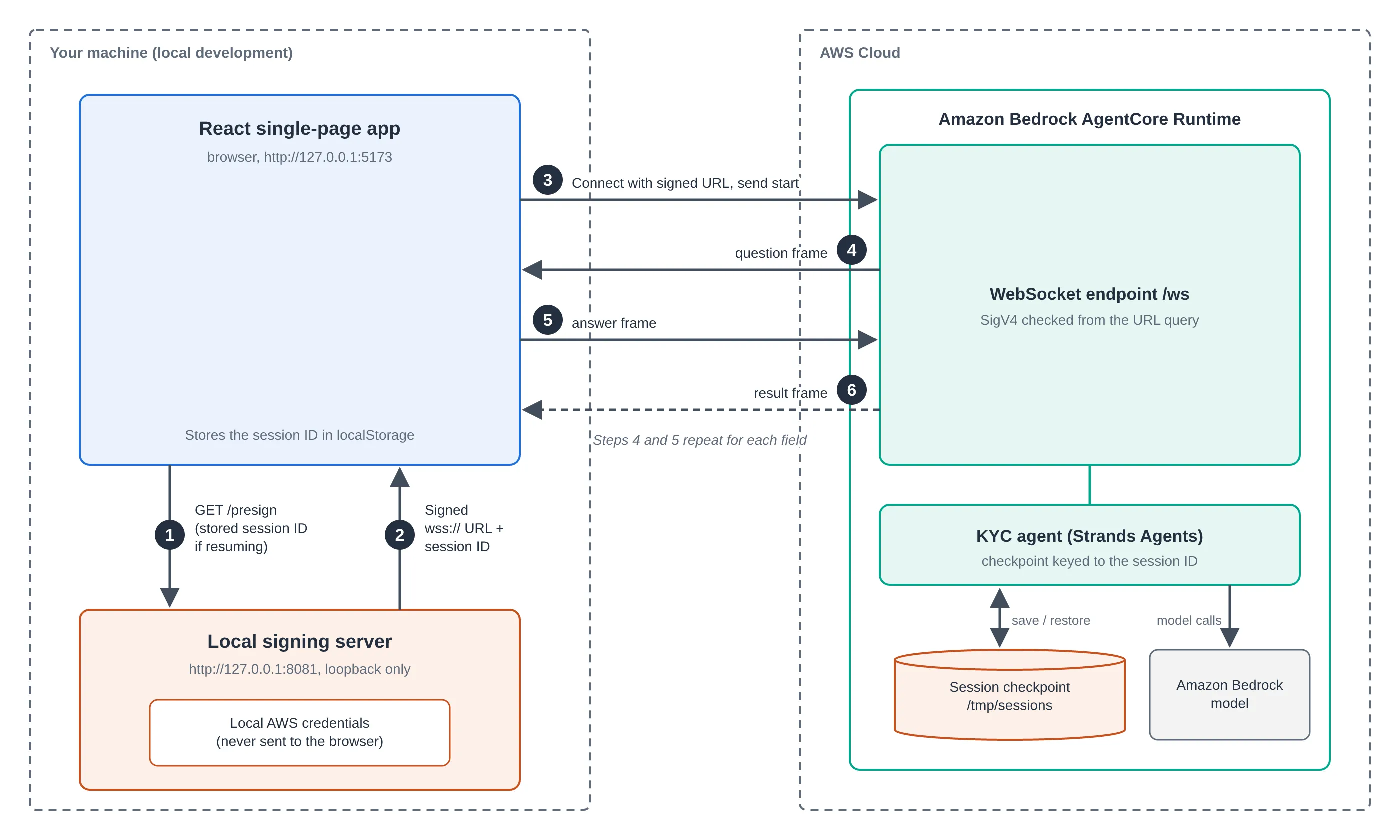
The flow between the browser, the local signing server, and AgentCore Runtime is:
- The browser calls
GET /presignon the signing server and passes a stored session ID to resume. - The server validates the ID and returns a signed URL — never the credentials.
- The browser connects to
/wsand sends astartframe. - The runtime sends a
questionframe. - The browser sends an
answerframe. Steps 4 and 5 repeat for each field. - The runtime sends a
resultframe.
Inside the runtime, the agent keeps its checkpoint in /tmp/sessions and calls its model in Amazon Bedrock. The signing server binds to loopback and allows one cross-origin resource sharing (CORS) origin. It’s a demo convenience — in production, users sign in through Amazon Cognito or another OAuth provider.
Handle questions, sessions, and reconnects in the SPA
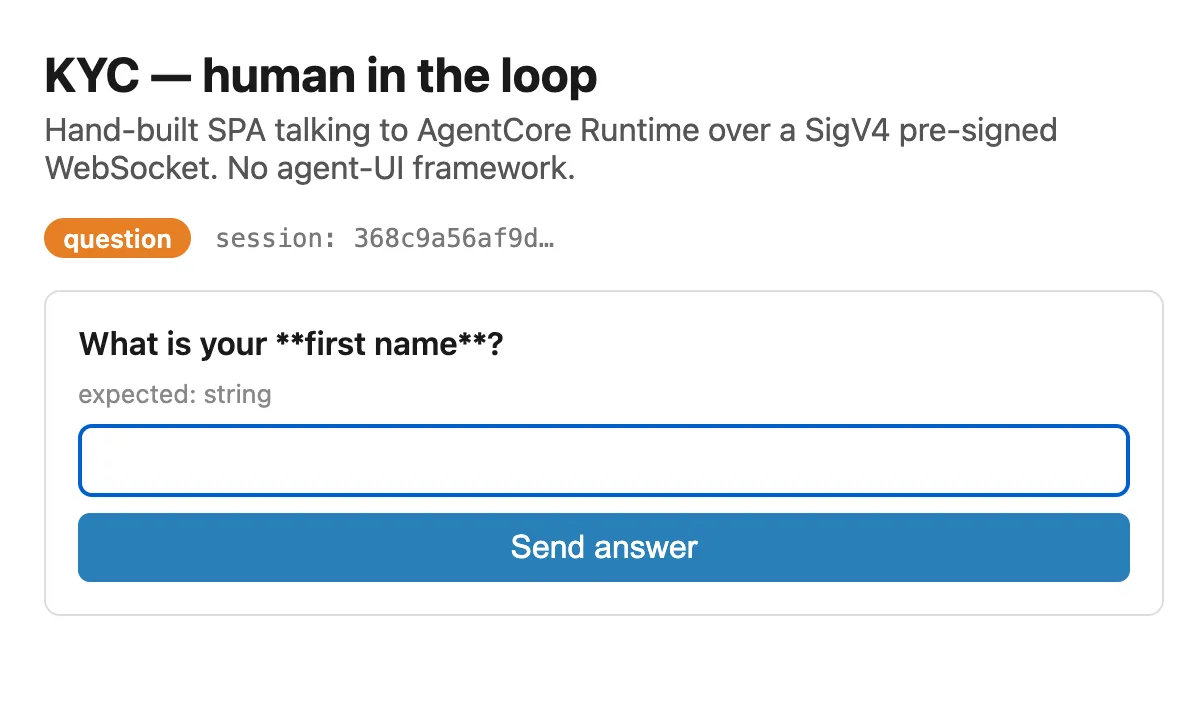
The React app is small, but every piece is code you maintain. Because incoming frames are untrusted, the client narrows each one to a known shape before acting on it.
function parseServerEvent(raw: unknown): ServerEvent | null {
  if (typeof raw !== "object" || raw === null) return null;
  const obj = raw as Record<string, unknown>;
  if (obj.type === "question") {
    if (typeof obj.interruptId === "string" &&
        typeof obj.question === "string" &&
        typeof obj.typeOfAnswer === "string") {
      return { type: "question", interruptId: obj.interruptId,
               question: obj.question, typeOfAnswer: obj.typeOfAnswer };
    }
  }
  // ...narrow the "result" and "error" shapes the same way
  return null;
}
The SPA also stores the session ID (so a reload or a dropped socket can resume the same run), opens the WebSocket, sends the start frame, renders each question, and sends the answer tagged with its interruptId. All of this is hand-written transport glue — which is exactly what AG-UI removes.
Step 5: Let AG-UI carry the round-trip
AG-UI is an open agent-to-user protocol that AgentCore Runtime already serves over SSE. Instead of inventing a private question/answer/result taxonomy, you adopt a standard event stream and an interrupt-aware run lifecycle: a run ends with an interrupt outcome, and the client starts a new run carrying per-interrupt responses.
With ag-ui-strands, the agent code barely changes — you swap the app class for an AG-UI adapter and let it translate the Strands interrupt into AG-UI events. The checkpoint is keyed to the AG-UI threadId the same way Step 4 keyed it to the AgentCore session ID, so resuming on the same threadId returns the user’s answer to that same interrupt() call and the tool body continues where it left off.
The payoff is less code: the hand-written frame validation, the three-message wire protocol, and much of the reconnection glue are replaced by a shared contract that both the agent and off-the-shelf frontend libraries already understand. AWS documents the requirements in the AG-UI protocol contract for AgentCore Runtime.
Key takeaways
- An interrupt only pauses — a checkpoint persists. Without
SnapshotSessionManagerkeyed to a stable ID, the resumed answer lands in an empty conversation and the agent restarts the form. - Return the value from
interrupt(). A barereturnmakes the model loop on the same question forever. - The transport is interchangeable. HTTP, SSE, and WebSocket all carry the same question data; pick based on streaming needs and how much reconnection logic you want to own.
- Key the checkpoint to the session. On AgentCore Runtime,
context.session_id(or AG-UI’sthreadId) is what lets a reconnect resume the same run. - The browser sends the first frame. In my testing the WebSocket proxy withheld server frames until the client sent a
startframe. - Never put AWS credentials in the browser. Use a SigV4 pre-signed URL for demos and an OAuth inbound authorizer with Amazon Cognito in production.
- AG-UI removes most of the hand-written glue. A standard event protocol over SSE beats a private message taxonomy once the round-trip gets real.
This post is based on an article I originally published on the AWS Builder Center. Any opinions in this article are my own.