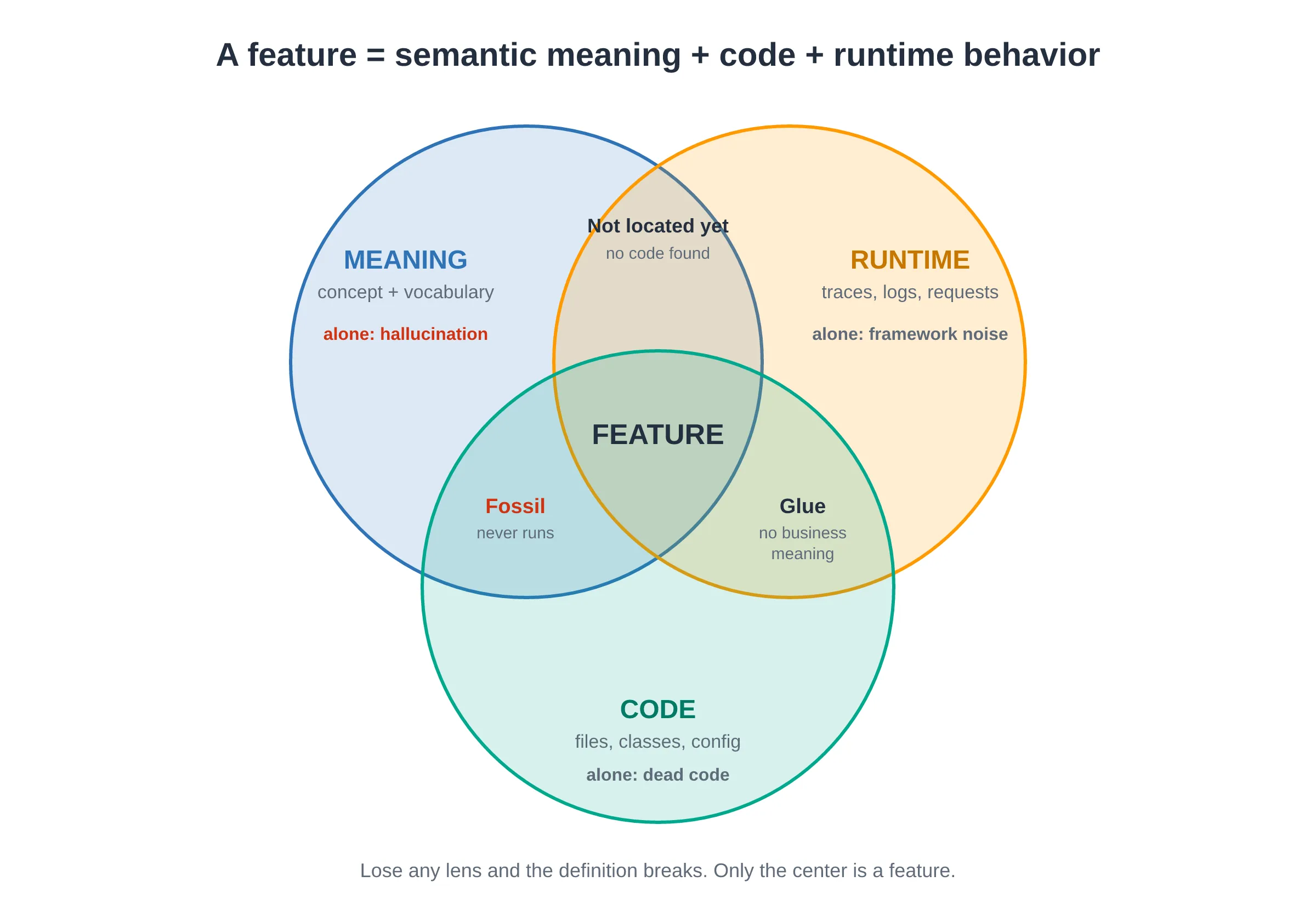
TL;DR — A feature is semantic meaning + code + runtime behavior, all three at once. Its category (UI, Business, Data, Cross-cutting) predicts how hard it will be to move. Cross-cutting features are features, so name them first. And a feature is not a function, a module, a service, a story, or a keyword.
Watch the 30-second summary
Auto-generated summary — read the full article below for details.
Before you can locate a feature, extract it, test it, or move it onto AWS, you have to agree on what one is. Sounds like philosophy. In my experience it is the most expensive decision you make early in the project. Every later phase inherits the definition you pick here.
This is Part 2 of my series Monolith Modernization, about finding and extracting features from the million-lines-of-code monsters that some of us get handed to modernize. It has no algorithms, no tooling, no concept lattices (those arrive in Part 4). It answers one question as carefully as it deserves: what is a feature?
If you are lifting a monolith onto AWS, this matters more, not less. Whether you replatform it whole, carve it into services behind Amazon API Gateway, or strangle it module by module, your migration plan is only as sharp as your feature list. A fuzzy definition here becomes a fuzzy backlog, a fuzzy test plan, and a fuzzy service boundary six months from now.
This is Part 2 of the Monolith Modernization series.
- Don’t Let AI Guess Where Your Monolith Breaks
- Excavating the Monolith: What Is a Feature? (this post)
Why the definition is load-bearing
A modernization pipeline is a chain, and “feature” is the link every phase grips.
- The inventory enumerates features.
- The safety net (characterization tests that pin current behavior) writes one test scenario per feature.
- The refactor plan slices work per feature.
- The validation phase builds a traceability matrix, mapping each feature to its tests and its code.
If your definition of “feature” is fuzzy, every one of those phases is fuzzy in the same way. Pick a definition that is too narrow and you drown in hundreds of trivial “features.” Pick one too broad and three real behaviors hide inside one blob you can’t test independently. The definition ends up as the schema for the whole project.
The trap: picking one lens
Ask six engineers “what is a feature?” and you get six answers, each correct and each incomplete.
- “It’s what the user can do.” (the product manager)
- “It’s a word in the requirements, a keyword.” (the search engineer)
- “It’s a concept in the domain.” (the architect)
- “It’s a cluster of tightly-coupled code.” (the person who just ran a static analyzer)
- “It’s an endpoint, a screen, a use case.” (whoever owns that layer)
- “It’s what lights up in the traces when a user clicks.” (the SRE staring at a dashboard)
Each answer is a lens, not the object. The failure mode is committing to one lens and building your whole process on it. Keyword-only definitions hallucinate features that aren’t there, and coupling-only definitions miss the features whose code is deliberately spread out. If you only trust traces, you miss everything your test run didn’t happen to exercise. The six answers collapse into three lenses, and you only see the feature when you hold all three up at once.
The three-lens model
A feature lives at three layers at once. One layer says what it means, one is written down as code, and one only exists while the system runs.
1. Semantic meaning — the concept and its vocabulary
This is the layer your product owner and users speak in. “User registration.” “Export to CSV.” “Currency conversion.” At this layer a feature is defined by an observable outcome. Someone does something, and the system responds in a way you could describe to a non-programmer. If you can’t state a feature as “the system lets X do Y so that Z,” you probably have a fragment or an implementation detail, not a feature.
Meaning doesn’t stay abstract. It deposits language in the code: register, RegistrationAction, signup, the users table, a POST /register route, a log line that says "user registered". I keep concept and vocabulary in the same lens because the vocabulary has no value on its own — it only points back to a concept. Text search and embeddings (vector representations that match on meaning, not exact words) can grab onto these words, and the words lie to you. The same word (user, process, manager) shows up across unrelated features, and the same concept hides behind different words (usr, account, member).
Here a legacy monolith hands you an artifact worth building. Domain-Driven Design calls the curated, agreed vocabulary of a system its Ubiquitous Language (Evans, 2003). A monolith you inherit doesn’t have one. It has the raw vocabulary the code accreted over a decade — synonyms and overloaded words and all. So one deliverable of feature work is a glossary that maps each agreed concept name to the code tokens that express it. That glossary is your defense against the vocabulary problem, and Part 3 shows how to build it.
2. Code — the static implementation
These are the files, classes, functions, config, and wiring that deliver the meaning. A refactor has to physically move this layer.
Notice that I don’t call it coupled code. A feature’s code is not always contiguous and not always tightly coupled. Validation, for example, is spread across most modules by design, and every one of those scattered fragments still belongs to the feature. Define a feature as a cluster of coupled code and you lose exactly the features that hurt the most when you split the monolith.
3. Runtime behavior — what really happens
Documentation and source code tell you what the system is supposed to do. Runtime behavior tells you what it does. It covers the execution paths a scenario triggers, the requests the system serves, the data it reads and writes, and the logs and events it emits along the way.
In my experience, the static picture and the runtime picture disagree more often than anyone expects. Each picture catches what the other misses. Static analysis sees code that never runs, so a feature someone switched off years ago still looks alive. Runtime analysis only sees the paths you exercised, so a feature nobody triggered during your test run looks absent. Cross-cutting features flip the problem around: they appear in almost every trace, which is why clustering tools filter them out as noise.
Eisenbarth, Koschke and Simon built feature location on this pairing back in 2003. Run a scenario, record which code executes, then cross-check it against the static structure. Where the two agree, you can trust the code set. Where they disagree, you have found something worth a conversation with the people who run the system. Part 4 builds on this.
Where the three lenses meet
| Lens | What it tells you | Where the evidence lives |
|---|---|---|
| Semantic meaning | That the feature exists and what to call it | Specs, user manuals, support tickets, identifiers, table names, the glossary |
| Code | What you will move | Source files, call graph, imports, config, shared tables |
| Runtime behavior | That the code delivers the meaning today | Execution traces, logs, request paths, code coverage per scenario, usage analytics |
A feature is the alignment of all three. Lose any lens and the definition breaks:
- Meaning without code gives you a hallucination.
- Code that never runs is dead code — or a fossil if it still carries a business name.
- Code that runs but means nothing to the business is glue, or a feature nobody has named yet.

What does the research say?
None of this is new. Rajlich and Wilde named concept location in 2002, and Dit et al. turned feature location into a citable 89-paper survey in 2013. But the best result is 39 years old and slightly insulting:
“In every case two people favored the same term with probability < 0.20.”
— Furnas, Landauer, Gomez, Dumais, The Vocabulary Problem in Human-System Communication, Communications of the ACM, 1987.
Two engineers name the same thing the same way less than one time in five. A 1987 paper predicted exactly why your 2026 grep-based inventory finds nothing. The whole field since has been one long apology for keyword search.
A taxonomy: not all features are the same kind of thing
Once you accept the three-lens model, features sort into recognizable categories, and the category predicts almost everything about how hard the feature is to handle.
| Category | What it is | Code shape | Difficulty |
|---|---|---|---|
| UI | Screens, forms, views the user sees | Templates + controllers, fairly localized | Low to medium |
| Business | Domain rules, workflows, calculations | Services + domain model, moderately coupled | Medium |
| Data | Persistence, schema, queries | Repositories + tables, coupling via data | Medium to high |
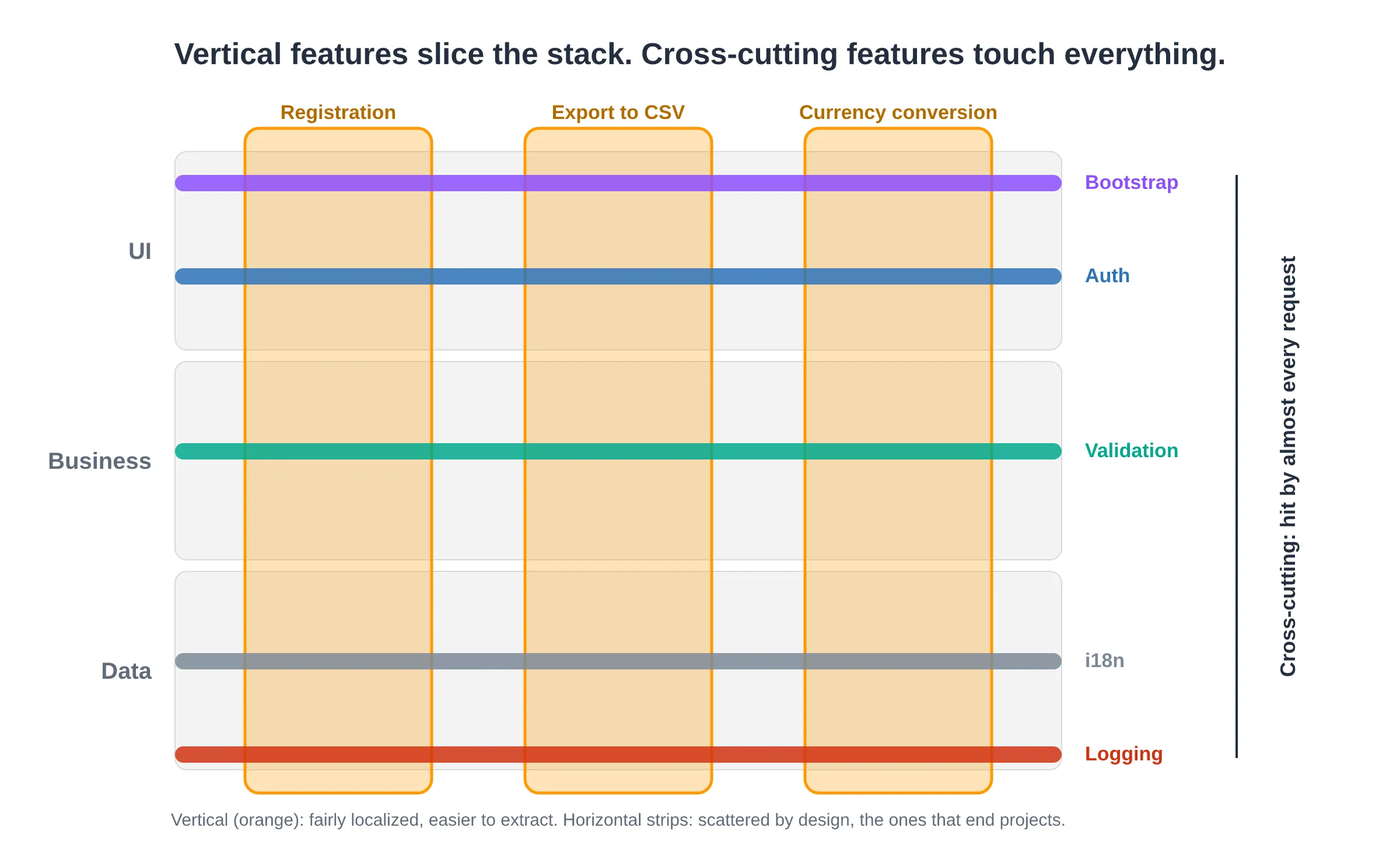
| Cross-cutting | Bootstrap, validation, i18n, logging, auth | Scattered by design, hit by almost every request | High |
The first three are “vertical.” They slice cleanly-ish through the stack for one behavior. The fourth is the one that ends projects.
Cross-cutting features are still features
The mistake I see most often in feature thinking is dismissing bootstrap, input validation, internationalization, and logging as “just infrastructure.” They are features. They carry meaning (“invalid input is rejected with a message”), they have code, and they show up at runtime. The trouble is how they show up: their code is spread across the whole system by design and executes on almost every request, so an automated clustering tool reads them as noise and a human skimming the tree reads them as framework glue. If you don’t name them explicitly, you will refactor around them and break everything that quietly depended on them.
Name your cross-cutting features first, precisely because they are the easiest to overlook. This is where AWS migrations go sideways. The moment you carve the first service out, in-process session handling, shared validation, and log files on local disk stop being free. Nobody listed them, so nobody moved them.
What a feature is not: drawing the boundaries
Definitions sharpen against their neighbors.
- A feature is not a function. A function is a unit of code. A feature is a unit of behavior that usually spans many functions across many files. One function can serve several features, and one feature uses many functions.
- A feature is not a module or package. Modules organize code for the compiler and the reader. Features cut across modules. Registration touches the web module, the domain module, and the persistence module.
- A feature is not a microservice. A service draws a deployment and ownership boundary and usually bundles several features plus their data. On AWS, that boundary becomes a deployable unit with its own data store, so a wrong feature cut turns into a wrong service cut — and a costly one to undo. (How features group into services is Part 5.)
- A feature is not a user story. A user story is a unit of work (“add a remember-me checkbox”). A feature is a unit of behavior (“authentication”). Many stories accrete into one feature over time. The story is the increment; the feature is the standing capability.
- A feature is not a keyword. A keyword is a clue the feature’s meaning leaves in the code. It helps you find the feature, but it is never the feature itself.
Holding these boundaries stops an inventory from ballooning into hundreds of “features” (when you’ve listed functions or stories) or collapsing into a handful of giant blobs (when you’ve listed modules).
The anatomy of a feature record
When you force a feature to become a written, reviewable artifact, a stable schema falls out — and that schema is the definition made concrete.
| Field | Which lens it captures |
|---|---|
| Name | meaning, in business language |
| Category | UI / Business / Data / Cross-cutting |
| Description | meaning, the observable outcome in prose |
| Entry points | where behavior begins (route, action, handler) |
| Files | code |
| Runtime evidence | runtime, the scenario, trace or test that shows it executing |
| Notes | risks, dependencies, migration implications |
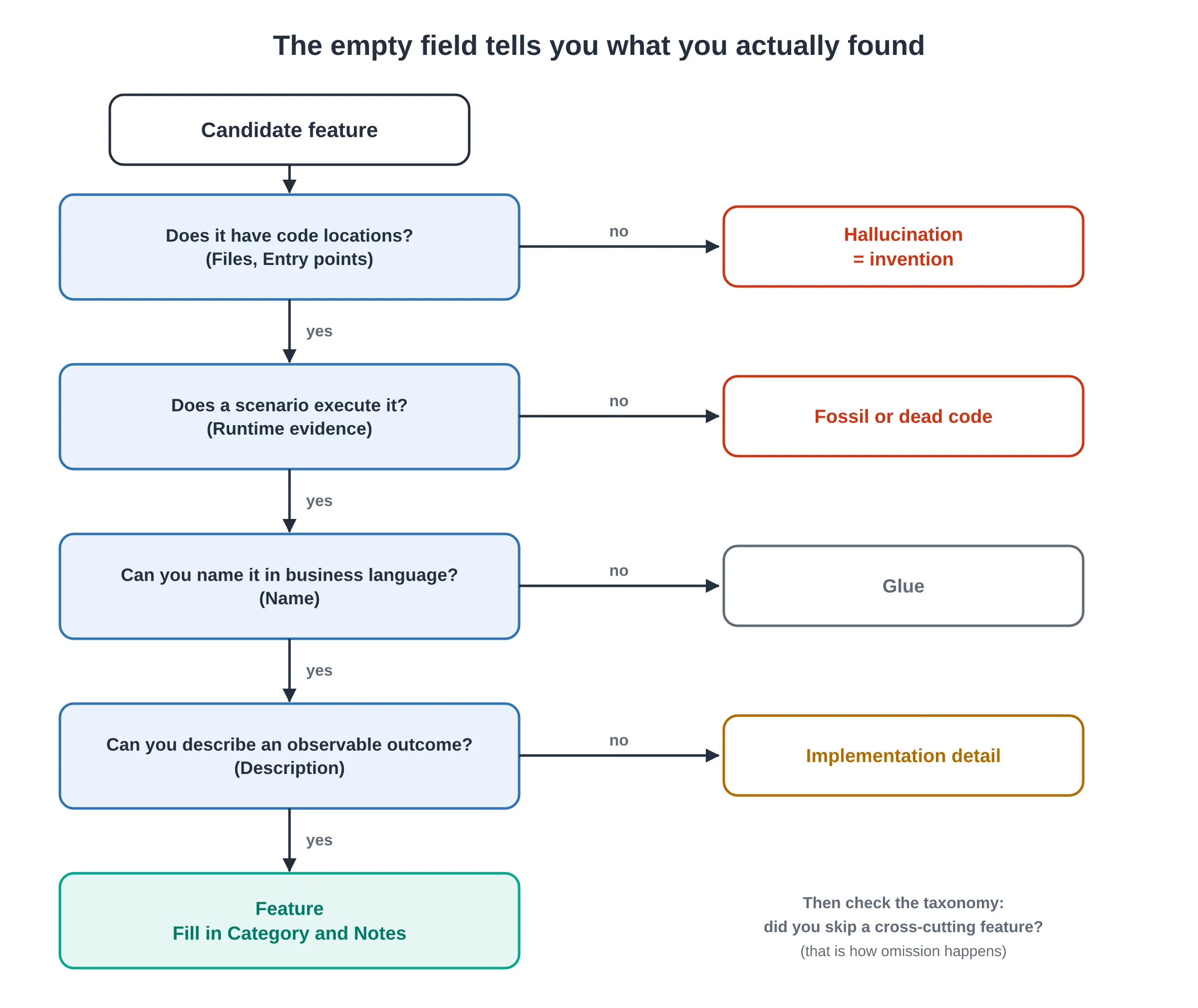
If you can fill in every field for a candidate, you have a feature. The empty field tells you what you actually found:
- No code locations → it’s a hallucination.
- No scenario ever executes it → it’s a fossil or dead code.
- You can’t name it → it’s glue.
- You can’t describe an observable outcome → it’s an implementation detail.
The lifecycle: features drift from their definition
A feature does not sit still. Over a codebase’s life it moves.
- Features fragment. A once-cohesive behavior gets its logic sprinkled across new layers as the app grows. The meaning stays single; the code scatters.
- Features tangle. Two features start sharing a utility, then a table, then a control-flow path. Their vocabulary blurs, and their runtime paths overlap.
- Features fossilize. Someone switches the feature off. It disappears from runtime, but the code and the vocabulary linger as dead weight that looks like a live feature.
- Features go undocumented. The feature runs every day and lives in users’ habits, but no document mentions it.
This drift is exactly why you can’t recover features from documentation alone (it describes intent, often stale) or from code alone (it shows mechanism, not whether anything still runs). You need meaning, code, and runtime evidence, reconciled — which is the problem Part 3 takes up.
War story: the first microservice has to prove something
On a recent engagement, nobody asked us to modernize the monolith. They asked us to prove it could be done. Several million lines of legacy Java, a platform its customers rely on every day, and a few days to get a first microservice running on AWS.
The hardest call came before any code moved: which use case do we carve out first? Pick something trivial and the demo proves nothing, because everyone in the room knows the easy parts were never the problem. Pick something central and you are still untangling it when the time runs out. The brief asked for a use case that was representative of the hard parts. That sounds harmless until you have to choose one.
Choosing meant knowing what each candidate dragged along with it. The business logic was the part everyone could see. Underneath, the code leaned on things the application server had always handled — loading configuration and wiring up monitoring. Neither had a line in the backlog, and the new service could not answer a single request until both existed. So we wrote them first, in a microservice that was supposed to be about business logic. The plan kept the platform running behind a proxy, so the extracted service could take over its slice of traffic without the rest of the system noticing. Carving it out was the hard part, and it was also what made the result credible. A first microservice proves value only when it is hard enough to convince the skeptics and small enough to finish.
Today I would write the feature record for each candidate before picking one. The category tells you how hard it will be. The Files and Notes fields expose the cross-cutting baggage before it surprises you halfway through the engagement.
The two failure modes to keep in mind
Every technique in the rest of this series gets judged against two errors that flow directly from a mushy definition.
- Invention — claiming a feature the system does not implement. The classic case is an analyst who “inventories” a login feature in an app that has no authentication.
- Omission — missing a feature the system does implement, usually a cross-cutting one, or one that runs every day but appears in no document.
A good definition — three lenses aligned and written into a record with a category — gives you the first and cheapest defense against both. You reject inventions because they have no code locations and no runtime evidence. You catch omissions because the taxonomy reminds you to look for the cross-cutting features you’d otherwise skip, and because runtime traces show behavior nobody wrote down.
With the definition in place, Part 3 takes up the mechanical question of finding features in a real monolith. How do you draw the line on your own codebase? If you have a war story where a fuzzy feature definition wrecked a migration, I’d like to hear it.
References
- Furnas, Landauer, Gomez, Dumais. The Vocabulary Problem in Human-System Communication. Communications of the ACM 30(11):964–971, 1987. doi:10.1145/32206.32212
- Rajlich, Wilde. The Role of Concepts in Program Comprehension. International Workshop on Program Comprehension (IWPC) 2002, pp. 271–278. doi:10.1109/WPC.2002.1021348
- Dit, Revelle, Gethers, Poshyvanyk. Feature Location in Source Code: A Taxonomy and Survey. Journal of Software Maintenance and Evolution, 2013. doi:10.1002/smr.567
- Eisenbarth, Koschke, Simon. Locating Features in Source Code. IEEE Transactions on Software Engineering 29(3):210–224, 2003. doi:10.1109/TSE.2003.1183929
- Evans, Eric. Domain-Driven Design: Tackling Complexity in the Heart of Software. Addison-Wesley, 2003.
This post is based on an article I originally published on the AWS Builder Center. Any opinions in this article are my own.